A TECHNOLOGIX ORIGINAL / SOLANA
MrBird.
A Matrix soul.
A mind for markets.
Your market workspace, on your terms. Explore Solana with a native app, a desktop terminal or a dedicated server — with simulation, visible controls and a record of what happened.
INDEPENDENT PROJECT · ANDROID / WINDOWS / SERVERTHE IDEA BEHIND THE BIRD
Build it. Test it.
Understand it.
Crypto tools can hide the details that matter. MrBird brings the setup, positions, fees and engine status into view. Start with simulated execution, inspect the activity and decide how you want to run it.
MRBIRD / MATRIX TERMINALDEVELOPMENT SCREENSHOT
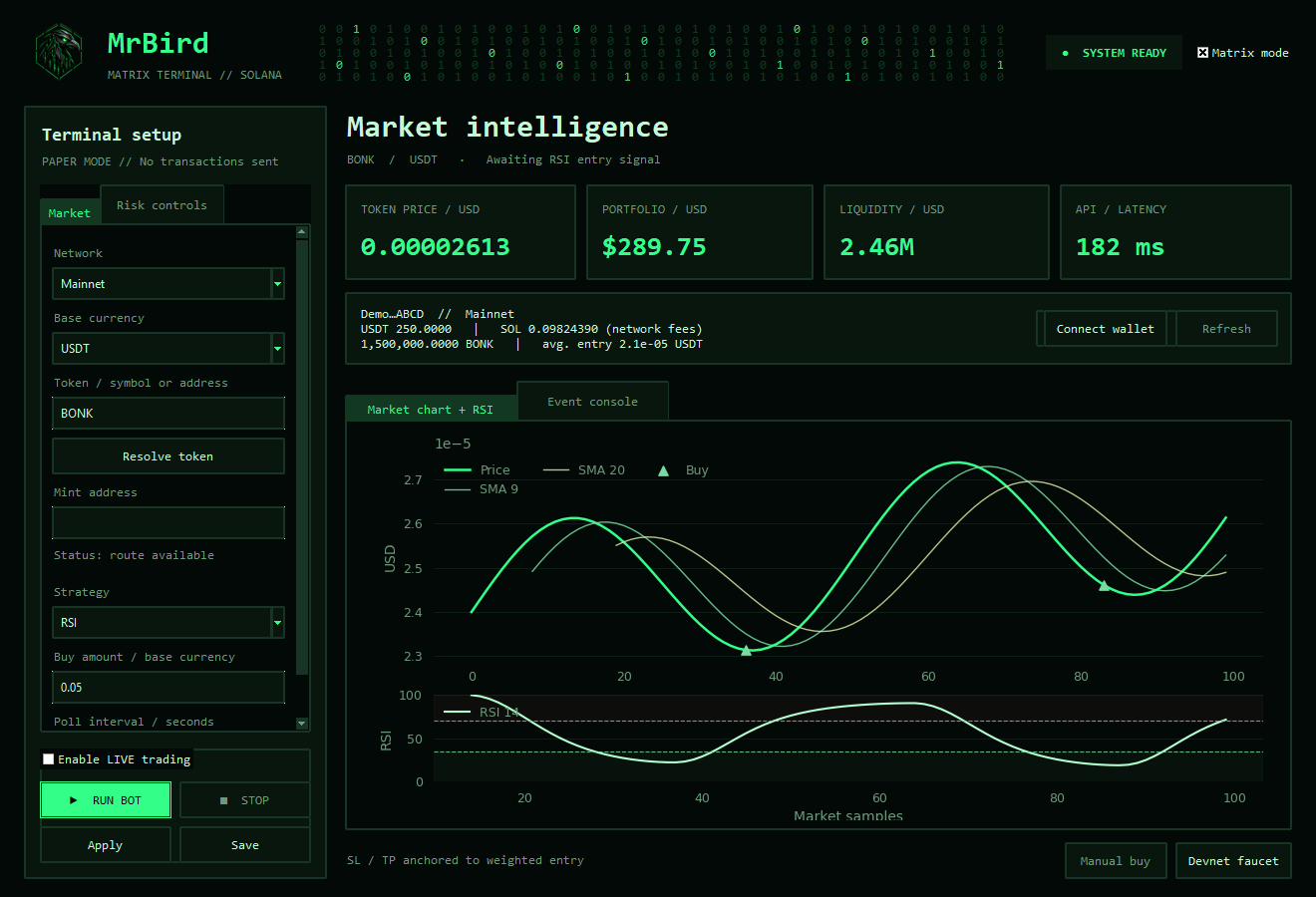
Interface captured during development. Features and appearance may change.
ONE PROJECT / DIFFERENT WAYS TO RUN IT
Your phone. Your desktop.
Your own engine.
Choose where the work happens. Each edition has its own capabilities and operating requirements.
01 / MRBIRD APP
A terminal
in your pocket.
ANDROID 11+A standalone Android application. The trading engine runs on your phone, so you don’t need to keep a PC running.
- See the market. A live-sample chart with SMA and RSI, plus token liquidity, volume and market context.
- Know your position. Wallet balances, tracked bot holdings and trade history, with links to confirmed LIVE transactions on Solscan.
- Stay informed. Native notifications for completed simulated trades and confirmed LIVE trades while the service is running.
- Unlock on your device. Wallet-key encryption through Android Keystore and device authentication.
The native app is independent of the server. Android battery and background-service limits can interrupt operation; it is not an always-on guarantee.
I’m interested in the app ↗02 / MRBIRD SERVER
Give the engine
a home of its own.
LINUX / PRIVATE WEB PANELRun MrBird as a dedicated Linux service, separate from your everyday phone or laptop. Open its browser-based control panel through configured private access.
- A persistent workspace. Settings, positions and accounting survive service restarts. Resume behaviour is configurable; LIVE resume is off by default.
- More market context. Closed 1m and 5m candles, volume, EMA20/50 and RSI14, with Trend Pullback and Volume Breakout strategies.
- A strategy lab. Compare fixed settings using historical candles and hypothetical fills with assumed trading costs.
- Watch the engine, too. Resource usage, connectivity probes, data freshness and the last successful engine cycle.
- Private demo invitations. Separate guest DEMO workspaces; LIVE remains owner-only. The current small-host configuration supports up to three accounts including the owner.
The server needs power, connectivity and working data providers. Remote access requires private networking or an appropriately secured connection. The Android app is not its remote-control client.
Tell me about the server ↗03 / MRBIRD DESKTOP
A bigger view.
A familiar workspace.
WINDOWSThe Matrix-style desktop terminal brings configuration, wallet information, charts and activity into one workspace.
- Configure your approach. Token, base currency, trade amount, daily buying limits and stop-loss / take-profit settings.
- Separate simulation and LIVE. Simulated execution uses market and quote data without sending swaps.
- Review the details. BOT 2.0 tracks completed trades, fees and position-based performance, including recovery checks for unresolved transactions.
The desktop engine needs its host to stay running. Its history and positions are separate from Android and server workspaces.
Ask about desktop access ↗FROM CURIOSITY TO A CLEARER PICTURE
Don’t just press start.
See what happens.
01Set your boundaries.
Choose the token, trade size and buying limits. Know which settings belong to the edition you’re using.
02Explore in simulation.
Observe signals and simulated trades before considering LIVE. DEMO and PAPER are simulation modes, not proof of future returns.
03Review the evidence.
Inspect activity, costs and tracked positions. On the server, explore the Lab’s historical scenarios and their assumptions.
PICK YOUR STARTING POINT
Where should your bird live?
BEFORE YOU ASK
A few things worth knowing.
Can I try it without placing real trades?
Yes. The editions include simulation modes. Server DEMO can start with virtual cash and a public wallet address without a signing key. Simulation still needs market-data connectivity, and simulated fills do not reproduce all real trading conditions.
Can I control the server from my phone?
The server has a mobile-friendly browser panel. Access outside your local environment needs a configured private connection, such as a VPN. The native Android app runs its own engine and is not currently a server controller.
Will it keep working when I close my laptop?
The dedicated server can operate independently of your laptop while its host, service and network remain available. The desktop edition requires its PC to remain running. Android operation is subject to system and battery limits.
Does MrBird guarantee profitable trades?
No. Automation can execute a process; it cannot guarantee returns. Trading involves potential loss, data outages, slippage and fees. Server Lab results are hypothetical, not audited or live performance.
How can I get access?
Send an enquiry below. Tell us which edition interests you and whether you want to explore simulation, a private demonstration or a server setup. Availability and suitable next steps are discussed individually.
A NOTE ON THE REAL WORLD
Automation still needs
your attention.
MrBird is a software project, not a promise of returns. Crypto trading can result in loss. Stop-loss and take-profit checks run in the application at polling intervals; they are not guaranteed on-chain orders. A stopped application or an API failure can delay those checks.
Start with simulation. LIVE requires an explicit opt-in; server LIVE resume is a separate setting and is off by default. Public downloads are not offered on this website. Ask us about current availability below.